
User-defined types
The type Userobject is a place
holder for user defined types . Such types can be used for
defining object-oriented data models. User-defined types are always
surrogate types.
The create type statement creates a new user defined type.
Examples:
create type Person
create type Student under Person
create type Teacher under Person
The result of a create type statement is a surrogate
object representing the so created
type. The new type will be a subtype of all the supertypes in the
under clause. If no supertypes are specified the new type becomes a
subtype immediately under the system type named
Userobject.
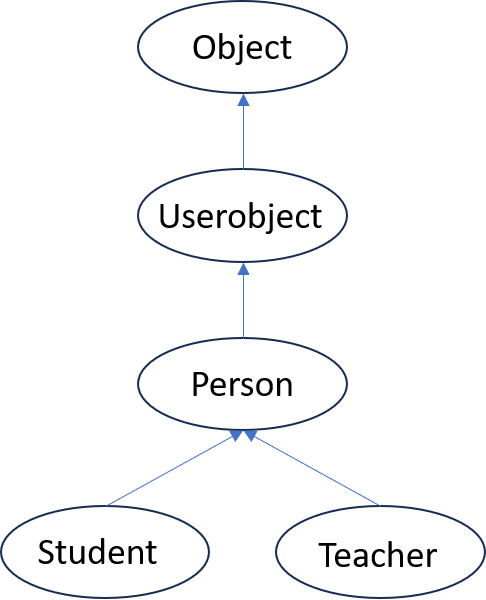
After the type definitions above the type hierarchy around type
Userobject will look like this:
Multiple inheritance is defined by specifying more than one supertype, for example:
create type TA under Student, Teacher
Defining properties
Properties of a type are defined as functions. The simplest kind of
functions are stored
functions,
tabulated in the local database. Let us add the
properties name and income to type Person as stored functions:
create function name(Person p) -> Charstring
  as stored
create function income(Person p) -> Real
  as stored
Creating user objects
The create statement can be used to populate the database by
creating objects of a given type. Each new objects can
thereby be assigned initial values for specified attributes
(properties).
Example:
create Person  (name,    income) instances
       :venus  ("Venus", 3500),
               ("Serena",3900)
The statement above creates two new user objects of type Person
and binds the session variable :venus
to one of them. It thereby sets values of the stored functions name
and income representing the properties name and income,
respectively.
When the database is populated we can make queries by calling the new stored property functions, for example:
name(:venus)
select name(p), income(p)
  from Person p
 where income(p) > 3500
A property can be any
updatable OSQL function having the
created type as its only argument, here name() and income(). For
each new object a comma-separated list of initial values for the
specified attributes functions can be specified as in the example.
Each initializer can have an optional associated variable, which will be bound to the new object. The variable name can subsequently be used as a reference to the object.
Example:
create Person(name, income) instances
      :pelle ("Per",383)
income(:pelle)
Expressions can be used as initial values.
Example:
create Person (name,income) instances
       :kalle ('Kalle ' || 'Persson' , 200*1.5)
name(:kalle)
income(:kalle)
The types of the initial values must match the declared result types of the corresponding functions.
It is possible to specify null for a value when no initialization is
desired for the corresponding function. Bag valued functions are
initialized using the syntax (values e1,...).
Deleting user objects
Objects are deleted from the database with the delete statement.
Example:
delete :pelle
The system will automatically remove the deleted object from all stored functions where it is referenced.
Deleting types
The delete type statement deletes a type and all its subtypes.
Example:
delete type Person
If the deleted type has subtypes they will be deleted as well. In this
case Student, Teacher, and TA and all theirs properties and
objects are deleted.
Example: After deleting type Person the following query fails.
select name(p), income(p)
  from Person p
Updates
Information stored in the database is represented as mappings between
arguments and results of functions. These mappings are either defined
at object creation time or altered by one of the function update
statements: set, add, or remove.
The set statement
The set statement sets the value of an stored function for given
arguments.
To illustrate how to use the set statement to populate an
object-oriented data model, assume the following model:
create type Machine;
create function name(Machine) -> Charstring as stored;
create function manufacturer(Machine) -> Charstring as stored;
create type Installation;
create function name(Installation) -> Charstring as stored;
create function machine(Installation) -> Machine as stored;
create function location(Installation) -> Charstring as stored;
Let's create two objects, one object of type Machine and one object
of type Installation bound to the session variables :m1, :i1,
respectively, without setting any of their properties:
create Machine instances :m1;
create Installation instances :i1
Now we can populate the database by setting the properties of the
machine :m1 and the installation :i1 one-by-one:
set name(:m1) = "L90F";
set manufacturer(:m1) = "Volvo";
set name(:i1) = "MiA";
set machine(:i1) = :m1;
set location(:i1) = "Eskilstuna";
We can update the name of installation :i1 to MiB:
set name(:i1) = "MiB"
Test it:
name(:i1)
Notice that the create object statement is
an alternative to setting property values one-by-one with the set
statement.
Example: Let's create another machines :m2 and an installation,
:i2 using the create object rather then the set statement:
create Machine (name, manufacturer) instances
           :m2 ("CBM 7000", "Hagglunds");
create Installation (name, machine, location) instances
           :i2 ("Cooler", :m2, "Bredbyn");
Let's define a derived function
to retrieve the installations of a machine m.
create function installations(Machine m) -> Bag of Installation
     as select i
          from Installation i
         where machine(i) = m
Test it:
select name(i), location(i)
  from Installation i
 where i in installations(:m1)
Object properties can also be updates by a set statements with a
query:
Example:
  set name(m) = 'CBM 8000'
 from Machine m
where name(m) = "CBM 7000"
Here the update retrieves machine m named CBM 7000 and then sets
the name ofm to CBM 8000. Let's test it:
select name(m)
  from Machine m
Updatable functions
Not every function is updatable. Stored functions are always updatable. A derived function is upatable only if its body contains a single call to an updatable function with all arguments of the derived function. In particular inverses of stored functions are updatable.
Example: The function installations(Machine)->Bag of Installation
being the inverse of machine(Installation i)->Machine is
updatable. Let's create a new installation :i3 located in Uppsala
without setting its Machine property:
create installation (name, location) instances
           :i3 ("Shedder", 'Uppsala');
We can now update the installations of :m2 to be both :i2 and
:i3:
set installations(:m2) = (values :i2, :i3)
Test it:
select name(i), location(i)
  from Installation i
 where i in installations(:m2)
The add statement
The add statement adds a result object to a bag valued function.
Example: Let's create a new installation :i4
located in Falun:
create Installation (name, location) instances
       :i4 ('Mymill', 'Falun');
Now we can add :i4 to the installations of :m2
add installations(:m2) = :i4;
Test it:
select name(i), location(i)
  from Installation i
 where i in installations(:m2)
The remove statement
The remove statement removes the specified tuple(s) from the result
of an updatable bag valued function.
Example:
remove installations(:m2) = :i2;
Test it:
select name(i), location(i)
  from Installation i
 where i in installations(:m2)
Updating Boolean functions
Setting the value of a Boolean
function to false means
that the truth value is removed from the extent of the function.
Example: Let's define a stored Boolean function.
create function needs_service(Installation) -> Boolean
  as stored;
Let' register that installation :i1 needs service.
set needs_service(:i1) = true;
Let's get those installations that need service:
select name(i)
  from Installation i
 where needs_service(i)
The following statement registers that installation :i1 has been
serviced:
set needs_service(:i1) = false;
Test it:
select name(i)
  from Installation i
 where needs_service(i)
Cardinality constraints
A cardinality constraint is a system maintained restriction on the number of allowed occurrences in the database of an argument or result of a stored function. For example, a cardinality constraint can be that there is at most one machine per installation, while a machine may have any number of installation. The cardinality constraints are normally specified by function signatures.
In our example above, the function machine(Installation)->Machine
restricts an installation to be on only one machine, while there may
be many installations on every machine. Therefore the following update
fails:
add machine(:i1) = :m2;
This one fails for the same reason:
set installations(:m2) = installations(:m1);
The system prohibits database updates that violate the cardinality
constraints. For the function machine() an error is raised if one
tries to make an update making the same installation on two machines.
In general one can maintain four kinds of cardinality constraints for a function modeling a relationship between types, many-one, many-many, one-one, and one-many:
One-many is the default when defining a stored function returning a
single value as in machine(Installation)->Machine. There can be one
machine for every installation and many installations for each
machine.
Many-many is specified by prefixing the result type specification of
a stored function with Bag of. In this case there is no cardinality
constraint enforced.
One-one is specified by suffixing a result variable with key.
Example:
   create function name(Machine m) -> Charstring nm key
     as stored
will guarantee that a machine's name is unique.
One-many is normally represented by an inverse function with
cardinality constraint many-one as for the function
installations(Machine)->Bag of Installation above being the inverse of
machine(Installation)->Machine.
Since inverse functions are updatable the function
installations(Machine)->Bag of Installation is also updatable and
can be used when populating the database.
Any variable in a stored function can be specified as key, which will restrict the updates to maintain key uniqueness.
Cardinality constraints can also be specified for foreign functions, which is important for optimizing queries using the functions. It is then up to the foreign function implementer to guarantee that specified cardinality constraints hold.
Dynamic updates
Sometimes it is necessary to create objects whose types are not known until runtime. Similarly one may wish to update functions without knowing the name of the function until runtime. This is achieved by the following procedural system functions:
   createobject(Type t) -> Object
   createobject(Charstring tpe) -> Object
   deleteobject(Object o) -> Boolean
   addfunction(Function f, Vector argl, Vector resl) -> Boolean
   remfunction(Function f, Vector argl, Vector resl) -> Boolean
   setfunction(Function f, Vector argl, Vector resl) -> Boolean
The function createobject() creates an object of the type specified
by its argument.
The function deleteobject() deletes an object.
The functions setfunction(), addfunction(), and remfunction() update a function given an argument list and a result tuple as vectors. They return true if the update succeeded.
To delete all rows in a stored function fn, use:
dropfunction(Function fn, Integer permanent)->Function
If the parameter permanent is the number one the deletion cannot be
rolled back, which saves space if the extent of the function is large.